Apex tests & Smart tests
How Diffbridge decides which tests to run, and how to hand-pick tests.
Running every local test on every deployment is the main reason Salesforce deployments are slow. Diffbridge's default, Smart, runs only what each deployment needs while still meeting Salesforce's production rules.
Choosing a test level
The Apex tests dropdown appears in the deploy panel and in each CI job:
| Option | What runs |
|---|---|
| Smart (recommended) | Diffbridge decides; see below |
| No tests | Nothing. In production, this is automatically upgraded to All local tests if Apex changed, because Salesforce would reject it |
| Specified tests | The test classes you pick (see below) |
| All local tests | Every test in the org that isn't from a managed package |
| All tests in org | Every test, including managed packages |
The panel previews the plan before you start, with the reasons. The deployment page shows it again afterwards.
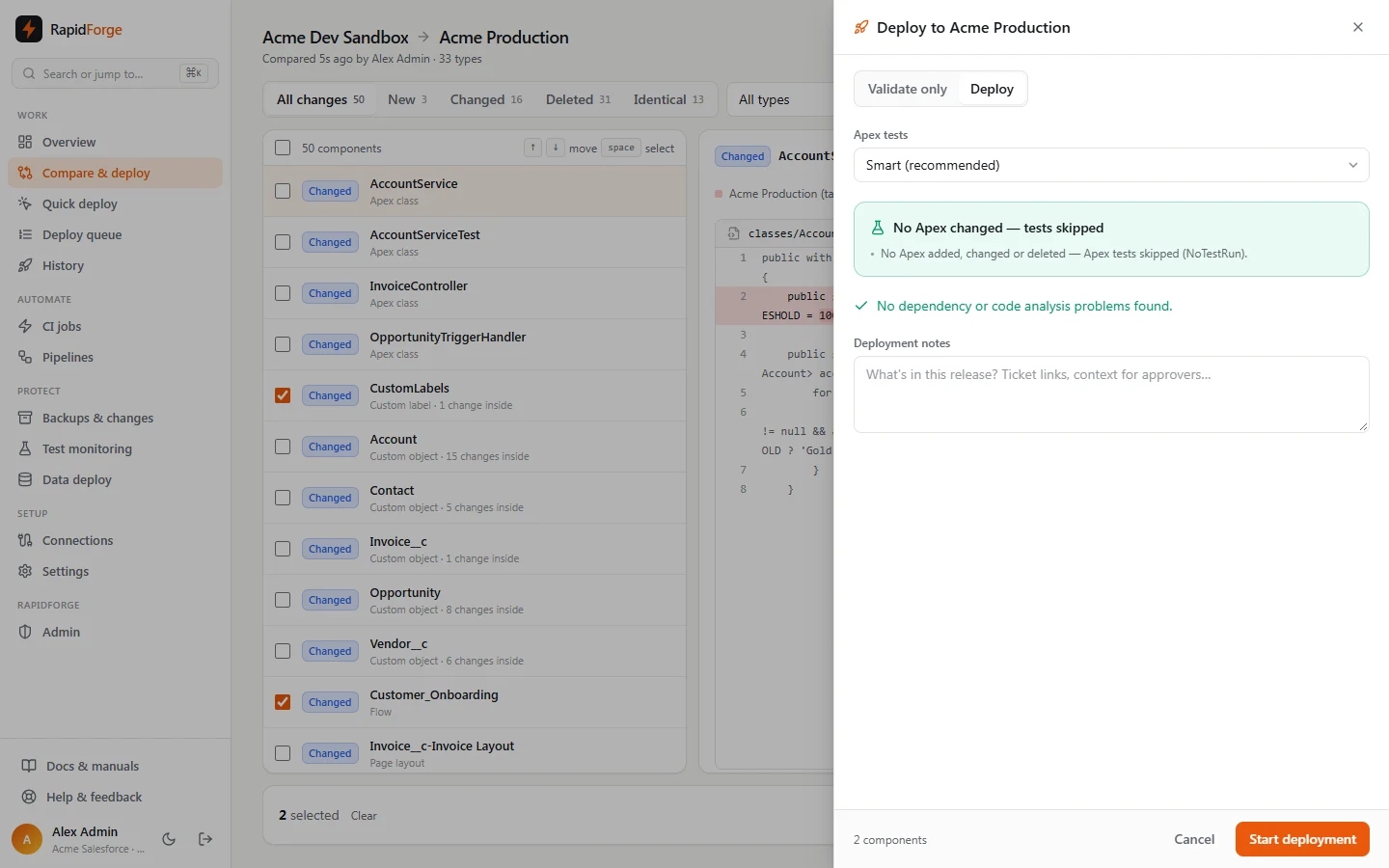
How Smart decides
- Identical Apex is dropped. Apex classes and triggers you selected that are byte-identical to the target are removed from the package; redeploying them changes nothing but would force tests.
- No Apex changes → no tests. If nothing in the package adds, changes or deletes Apex, the deployment runs with No tests, even into production. Salesforce only requires tests when Apex is deployed.
- Apex changed → related tests. Diffbridge finds the tests that exercise the changed code:
- test classes in the package,
- naming conventions (
FooTest,Foo_Test,FooTests,TestFoo,Test_Foo), - test classes that reference the changed class or trigger,
- for triggers, tests that use the trigger's object.
- Production safety. In production, if any changed class has no related test, Smart runs All local tests instead, because Specified tests requires 75% coverage for every class in the package. In sandboxes, related tests run if there are any; otherwise tests are skipped.
- Deleting Apex counts as an Apex change.
The Overview page tracks how much time Smart tests saved over the last 7 days.
Hand-picking tests
Choose Specified tests and a picker appears:
- It lists every test class in the target org, plus test classes that are only in the source (marked new in package; they run only if they're deployed in this package).
- It starts with the tests Diffbridge would pick, marked suggested. Add suggested restores them; Clear empties the list.
- Search filters by name; press Enter to add the top match. Selected only shows just your picks. Use the select-all row to tick everything matching your search.
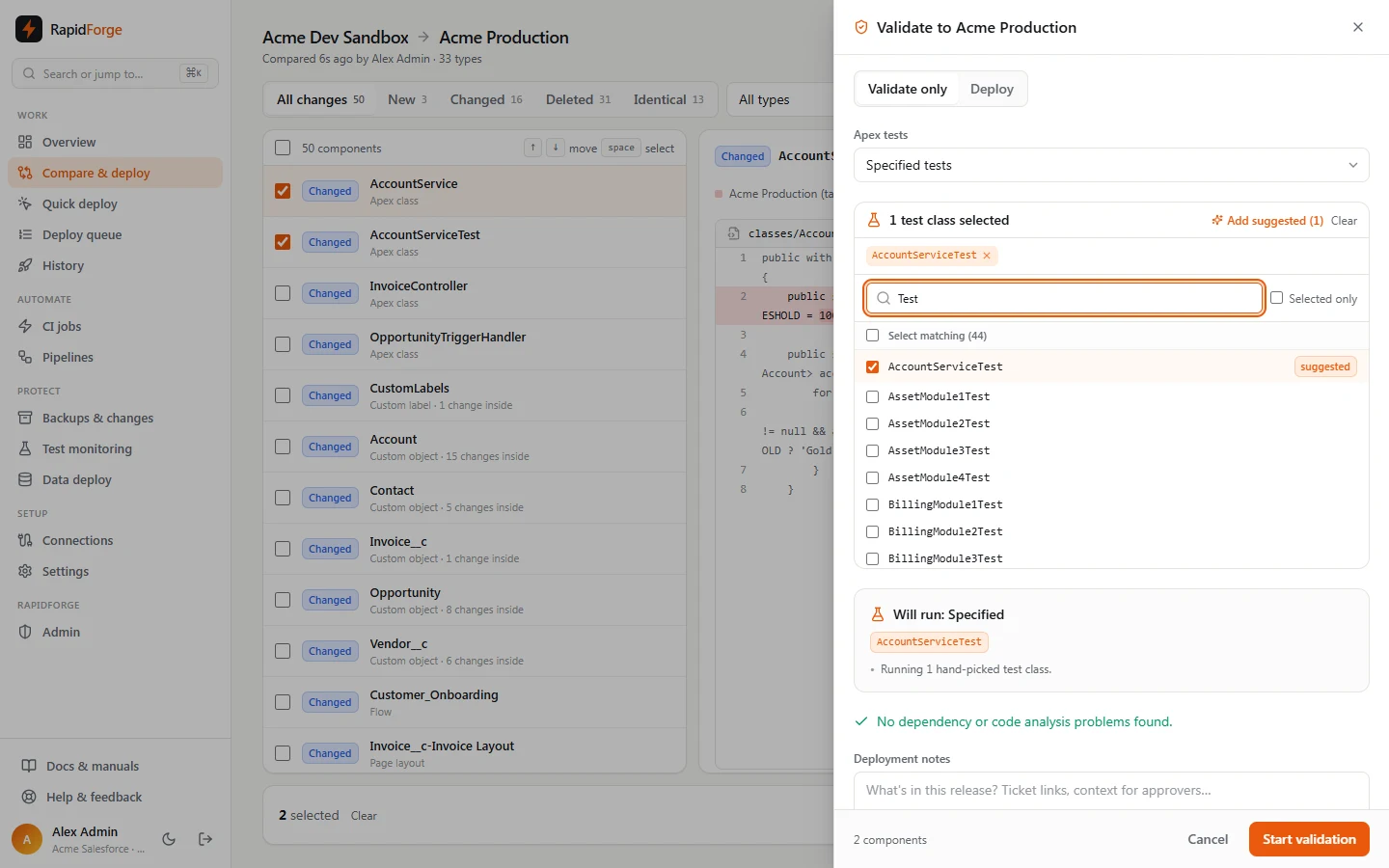
Diffbridge runs exactly what you pick, with two safeguards:
- Coverage warning: in production, if none of your picks reference a changed class, you'll see a warning that Salesforce may reject the deployment for coverage. Your choice is respected.
- Unknown tests are blocked: a test that won't exist in the target after this deployment makes Salesforce fail immediately, so Diffbridge stops you. If the test is in the source, the problem offers Add to include it in the package.
If you pick nothing: No tests in sandboxes, or All local tests in production when Apex changed.
In CI jobs
Edit a CI job, set Apex tests to Specified tests, and pick from the target org's tests. Leave the list empty to have Diffbridge pick related tests fresh on every run.
Quick deploy of validations
A validation that ran tests can be promoted with Quick deploy within 10 days: Salesforce deploys the validated package without re-running tests. A validation that ran no tests offers Deploy this package instead, which deploys the same zip again.