Pipelines
Model Dev → UAT → Production and promote with one click.
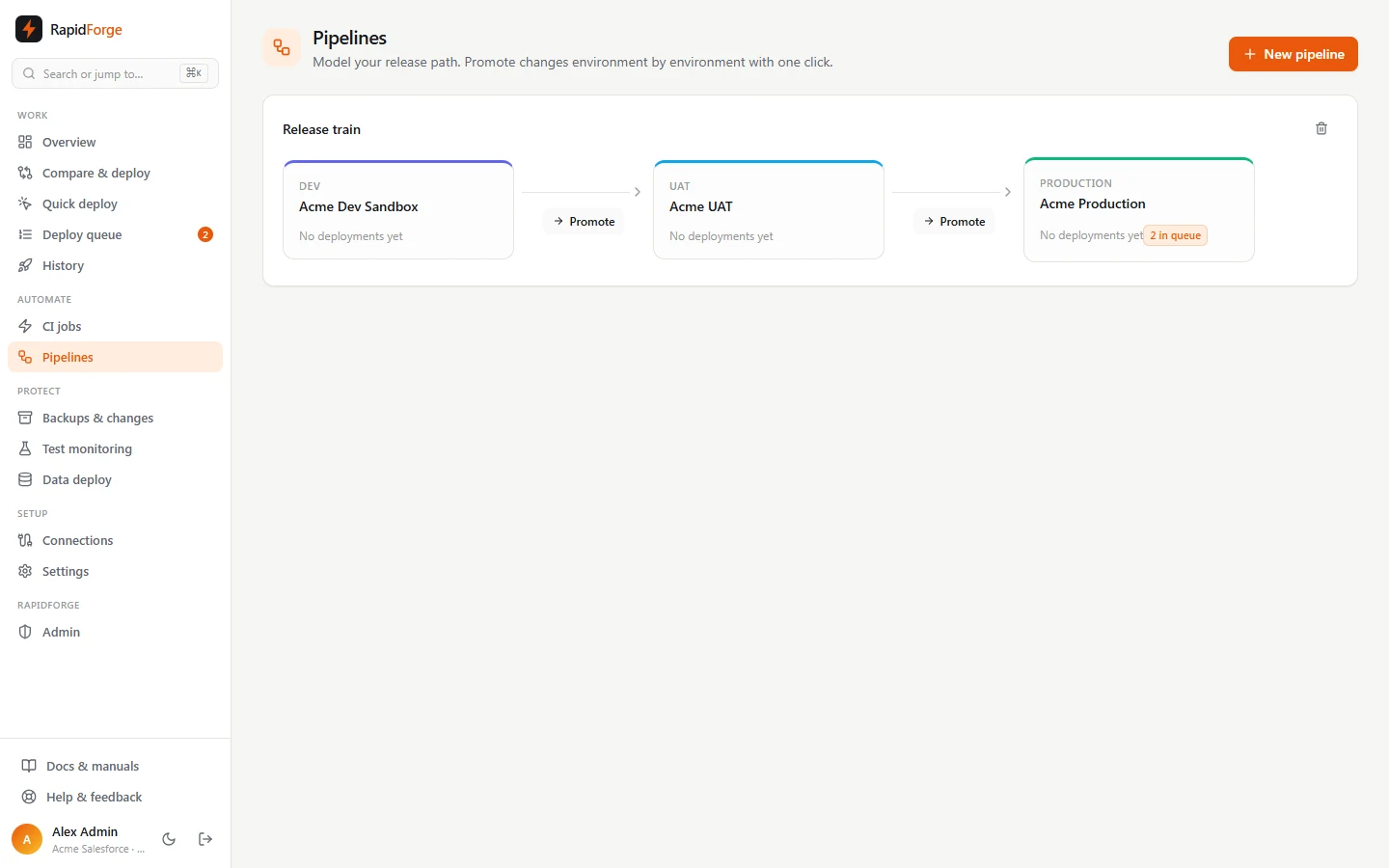
A pipeline is your release path: an ordered list of environments such as Dev → QA → UAT → Production. The board shows each environment's latest successful deployment and how many jobs are waiting, and lets you promote changes to the next environment in one click.
Create a pipeline
Pipelines → New pipeline (owners/admins). Give it a name, then add at least two environments in promotion order. Each environment is a name plus an org. You can add, remove and rename environments.
The board
Each environment card shows:
- the environment name and org (with the org's color along the top),
- the last successful deployment (not validations) and when it finished,
- a badge with jobs in the queue for that org; click it to open the queue.
Between environments there's a Promote button.
Promote
Promote compares environment N with environment N + 1 and opens the comparison. From there you review, pick and validate or deploy exactly as usual. Smart tests, approvals, superseding and rollback all apply.
Back-propagate
Hotfixes often go straight to a later environment. To bring the earlier ones back in line, click Back-propagate on an environment whose last deployment succeeded. Diffbridge creates one comparison per earlier environment, holding exactly that deployment's components, from that environment into each earlier one. Open them from the list, review, and deploy.
Promotion always goes through a comparison you review. Nothing is deployed automatically from a pipeline board; use CI jobs for hands-off deployment.
Git branch pipelines (pull requests)
Choose Git branches (pull requests) when creating a pipeline, pick the repository, and give each
environment a branch (for example develop → uat → main). Then:
- Set up branches & CI creates any missing environment branches (from the first one, or the repository's default branch), and for every environment a CI job that deploys pushes to its branch into its org, plus one that validates pull requests into its branch.
- Make changes on a feature branch: compare an org with the repository and Commit to branch. Open PR into develop (the first environment's branch) from the pipeline.
- Between environments, Open PR proposes promoting one branch into the next; Back-propagate (PR) opens one in the other direction, for hotfixes.
- Merge merges the pull request with Diffbridge's semantic merge, and the receiving branch's CI job deploys the result to that environment. On GitHub and GitLab repositories with a token, the pull request is opened there too and shows as merged.
Semantic merge
Git merges metadata line by line, so two people adding different permissions to one profile, or different fields to one object, "conflict" even though nothing clashes. Diffbridge merges profiles, permission sets, objects, custom labels and layouts item by item: an item changed on one branch takes that change, the same change on both is taken once, and only an item changed differently on both branches is a conflict. Other files (Apex, flows, LWC) get a three-way line merge, where two insertions at the same spot (two new methods, say) are both kept.
A merged pull request lists what both branches changed and was combined automatically. Real conflicts are listed with the component and the item or lines: fix them on the pull request's branch and Try again.