Permissions report
Profiles and permission sets against objects and fields, and every user's effective access.
Permissions (under Setup in the sidebar, admins only) answers "who can do what in this org?", read live from the org's profiles, permission sets and assignments.
Pick an org and an object. Four views:
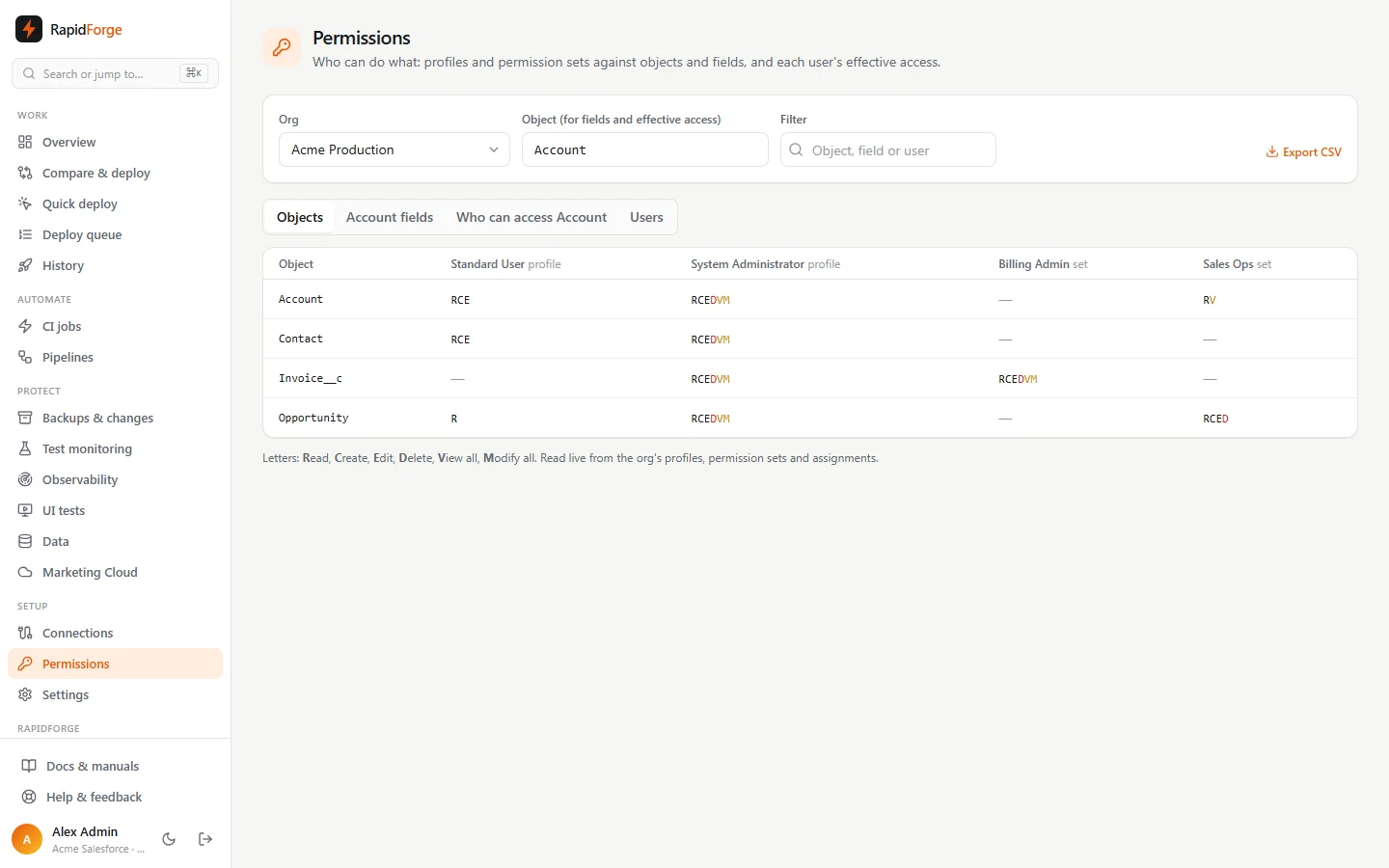
Objects
Every profile and permission set as a column, every object as a row, with the access each grants: Read, Create, Edit, Delete, View all, Modify all. View all and modify all are highlighted because they bypass sharing. Column headers show how many active users get each one.
Fields
Field-level security for the chosen object: edit, read or nothing, per profile and permission set.
Who can access an object
Each active user's effective access to the object: their profile plus every permission set assigned to them, combined, with the sets that grant it and their access to each field. Use it to answer audit questions such as "who can delete Opportunities?" or "who can see Annual Revenue?". Inactive users are never counted.
Users
Every user with their profile and assigned permission sets. Inactive users are dimmed.
Exporting
Export CSV downloads the current view, ready for an access review or an auditor. The same data is
available from the API: GET /api/orgs/<id>/permissions?object=Account&format=csv&view=effective.
Permission set groups appear as a column of their own, with the combined permissions of the group.